Direct answer: Start here if you are rebuilding, studying or troubleshooting a legacy KalOnline server environment. The guides separate the parts that are broadly consistent from the settings that depend on your exact server package.
Start with the system map
A KalOnline server package is normally a stack, not one application. The client talks to one or more game services; those services read configuration files and connect to Microsoft SQL Server through direct connection strings or named ODBC data sources. Authentication and game data are often kept in separate databases.
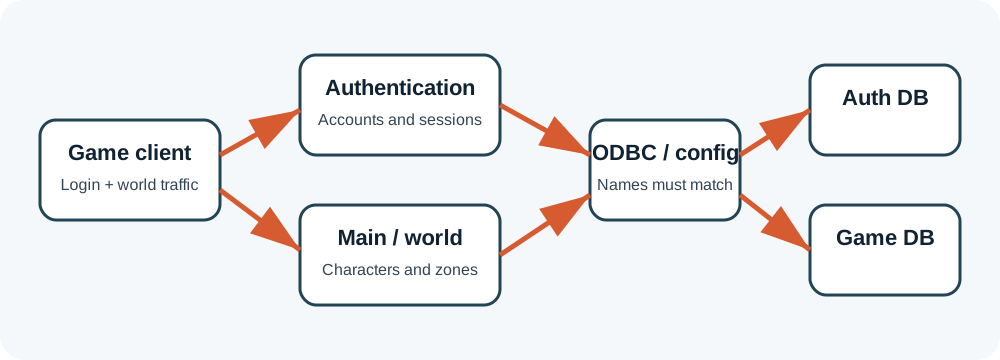
The safest way to work is layer by layer: confirm SQL first, then databases, then DSNs, then configuration, then one server process at a time. Starting everything together makes the first useful error disappear inside a pile of secondary errors.
Recommended learning path
Tools without mystery
Old archives often contain many utilities with vague names. Do not install all of them. The tools guide groups them by job—account administration, configuration packing, map or spawn editing, launchers, checksums and server control—and explains what evidence to collect before trusting one.
ZHowTo does not mirror unknown executables or proprietary server packages. That is deliberate. Old game tools are frequently unsigned, repacked and difficult to verify. The useful part is understanding what a tool changes, how to back up the target files and how to reverse the change.
Solve symptoms in dependency order
| Symptom | Best first guide | Why |
|---|---|---|
| SQL login or Error 18456 | SQL login errors | The server cannot reach usable database credentials. |
| ODBC test fails | ODBC and DSN setup | Driver architecture, instance or DSN name is wrong. |
| EXE opens then closes | Process closes immediately | Logs, runtime dependencies or config usually reveal the first failure. |
| Works locally, not on another PC | Network testing | Separate application problems from firewall and NAT problems. |
| Old client fails on Windows 11 | Windows 11 compatibility | Legacy runtimes, permissions and anti-cheat components can conflict. |
What these guides do not provide
These pages do not distribute proprietary game files, cracked launchers, anti-cheat bypasses, stolen databases or instructions for attacking public servers. They are written for lawful archival study, local labs, compatibility work and administration of systems you control.
Package names and schemas vary. When a guide says “authentication database” or “game database,” use the names included with your own authorized package rather than blindly creating names copied from an unrelated tutorial.
Package-specific values vary. Verify names, ports, database schemas and permissions against the files you are legally authorized to use. ZHowTo does not provide proprietary server files, anti-cheat bypasses or instructions for unauthorized access. Corrections: bugridez@gmail.com.