Direct answer: A DSN can be technically valid and still useless if it is created in the wrong ODBC administrator or has a name different from what the executable expects.
Why ODBC causes confusion
On 64-bit Windows there are separate 32-bit and 64-bit ODBC administrators. Many old KalOnline executables are 32-bit and cannot see a DSN created only in the 64-bit tool. The DSN name can also be hard-coded or referenced in a configuration file, so spelling and capitalization should be copied exactly.
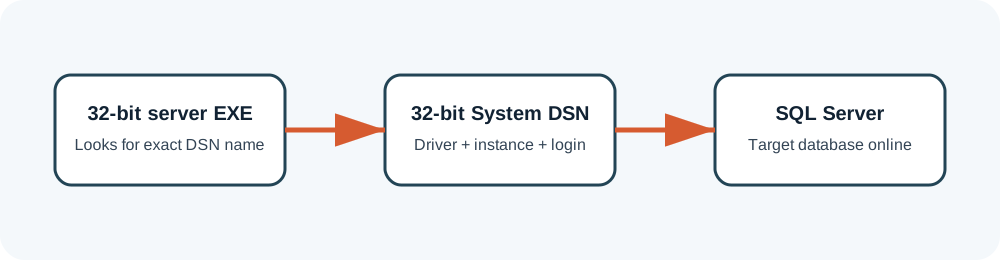
Create the DSN deliberately
- Identify application architecture. Assume old executables are 32-bit unless verified otherwise.
- Open the matching ODBC administrator. On 64-bit Windows, the 32-bit tool is normally in
SysWOW64. - Create a System DSN. Server services may not see a user-only DSN.
- Copy the expected name exactly. Search configuration files and package notes.
- Select the exact SQL instance. Named instances must include the instance name.
- Use the application login. Do not test only with your administrator account.
- Select the expected default database. Then run the built-in connection test.
Diagnose by layer
| Result | Meaning | Next move |
|---|---|---|
| Server not found | Instance, protocol or service discovery problem | Test the exact instance in SSMS on the same machine. |
| Login failed | Authentication or database mapping problem | Test the same login directly in SSMS. |
| DSN test succeeds; app fails | Name, architecture, config or schema mismatch | Confirm 32-bit DSN visibility and application logs. |
| Works as admin only | Permission or user-scope problem | Use a System DSN and inspect file/service permissions. |
Questions that reveal hidden DSN problems
Why can SSMS connect while the application cannot?
SSMS may use your Windows account, a different driver or a different instance name. The application may use a 32-bit System DSN and a SQL login. Reproduce the application path instead of treating any successful SQL connection as proof.
User DSN or System DSN?
A System DSN is generally safer for server software because it is visible beyond one interactive Windows profile. If the process runs under a service account, a User DSN created under your administrator login may be invisible to it.
Should the DSN default to the authentication or game database?
Use the package’s configuration and separate DSNs when required. Some components connect to different databases. Pointing every DSN to one database can make the connection test pass while the application later reports missing tables.
How should DSNs be documented?
Save the exact name, architecture, driver, SQL instance, authentication method and default database. Do not record the password in a publicly shared screenshot. A one-page DSN inventory is invaluable when rebuilding the VM.
Package-specific values vary. Verify names, ports, database schemas and permissions against the files you are legally authorized to use. ZHowTo does not provide proprietary server files, anti-cheat bypasses or instructions for unauthorized access. Corrections: bugridez@gmail.com.