Gaming & Legacy PC
Gaming setup and troubleshooting guides
This library focuses on durable problems: games that will not start, save-file protection, old Windows compatibility, dedicated-server networking and the KalOnline systems readers already use. It does not chase rumours, fake “hacks,” cracks or unsafe download bait.
Popular troubleshooting paths
Game won’t launch on Windows
Use the visible symptom to choose between launcher, game-file, runtime, Gaming Services, graphics-driver, security and account checks.
Back up game saves before reinstalling
Separate save data from installed game files, identify local and cloud copies, and test that a backup can actually be restored.
Old games and 32-bit tools on 64-bit Windows
Understand WOW64, old installers, runtime dependencies, drivers and the confusing difference between 32-bit and 64-bit ODBC tools.
Dedicated game server networking
Prove application, local firewall, LAN addressing, router NAT and public reachability in that order.
KalOnline documentation
Existing ZHowTo audience
Build and troubleshoot a KalOnline server lab without guessing
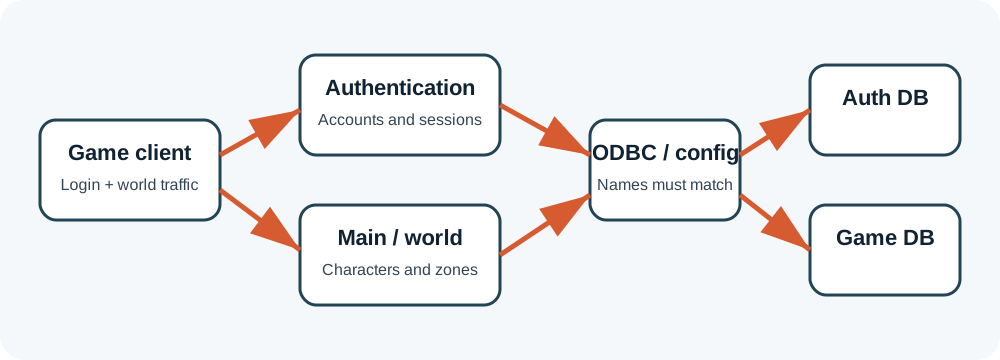
The KalOnline cluster preserves the topic that already sends visitors to ZHowTo. It covers architecture, SQL Server, restore compatibility, ODBC, configuration, startup order, tools, networking, Windows 11, backups and errors.
What belongs here
Configuration
Settings, compatibility, runtimes, account state, launchers and files you are authorized to use.
Data protection
Backups, save locations, restore testing and reversible changes before reinstalling or modding.
Lawful administration
Private labs and servers you control—never bypasses, stolen files or unauthorized access.
How these guides are checked
For Windows behavior, we prioritize official Microsoft and platform documentation. For legacy games, package-specific details are clearly labeled because ports, database names, schemas and utilities vary. Community reports can reveal symptoms, but they are not treated as universal configuration facts.