Direct answer: A tool name tells you very little. Before running an old editor or launcher, identify its input format, output format, package generation and rollback path.
Common tool categories
| Category | Typical job | Main risk |
|---|---|---|
| Account maker/admin | Create accounts or change access levels | Wrong schema, weak passwords or excessive permissions |
| Item/NPC/spawn editor | Edit database rows or packed configuration | Targets another package version and corrupts data |
| PK/INI/DAT packer | Unpack or rebuild client configuration archives | Wrong key, format or encoding makes client unusable |
| Launcher/updater | Start client, patch files or select server | Unsigned code, insecure update endpoints or overwritten files |
| Server controller | Start and stop several processes | Hides the first error and wrong startup order |
| Checksum/MD5 utility | Generate or verify file hashes | Confusing integrity with safety |
| Map/world editor | Edit world, portals or map data | Package-specific binary formats and irreversible output |
Seven questions before running a tool
- What exact file or table does it read?
- What exact file or table does it write?
- Which package/version was it built for?
- Does it need SQL administrator access?
- Can you inspect the change in a copy first?
- Can you restore the database or file instantly?
- Can you verify the archive source and hash?
Safe tool-testing workflow
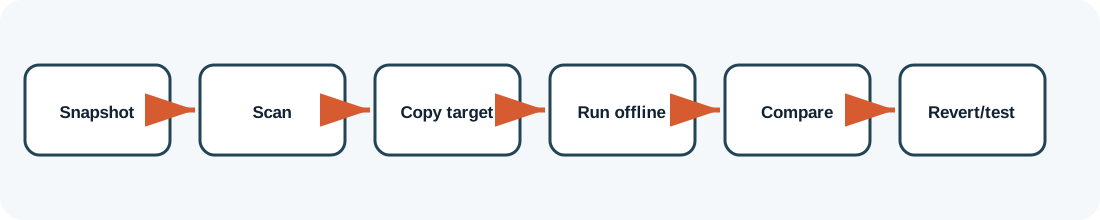
Take a VM snapshot and database backup, duplicate the target file, run the tool offline, compare before and after, start the minimum server component needed for validation, and revert immediately if the tool writes unexpected changes.
Why this page does not mirror downloads
Old forum lists show dozens of utilities, but availability and integrity change. A filename alone is not enough to establish that an executable is safe or compatible. ZHowTo therefore documents purpose and verification rather than republishing unknown binaries.
When you obtain a tool legally, preserve its original source page, archive hash and any version notes. A clean antivirus result is useful evidence, not a guarantee.
How to judge an old utility without trusting its label
Inspect file behavior
Run the tool in an isolated VM with process and file monitoring if you have the skills. Observe which folders, registry keys, network destinations and database tables it accesses. A tool advertised as an item editor should not need unrelated browser data or external network access.
Compare output before importing it
When a utility generates SQL or configuration, open the output as text where possible. Look for hard-coded database names, destructive statements and encoding changes. Import only into a disposable copy first.
Compatibility is more than a year label
Two packages released in the same year can use different custom schemas or pack formats. The strongest compatibility evidence is a tool readme naming the package, successful use by multiple known users, and a reversible test against your own copy.
Do hashes prove safety?
A cryptographic hash proves that two files are identical; it does not prove the file is harmless. Hashes are still valuable because they show whether your archive matches a known release and whether it changed after transfer.
Package-specific values vary. Verify names, ports, database schemas and permissions against the files you are legally authorized to use. ZHowTo does not provide proprietary server files, anti-cheat bypasses or instructions for unauthorized access. Corrections: bugridez@gmail.com.