Direct answer: A second computer on the same network is the cleanest test of whether the server is actually listening beyond localhost. Public port forwarding comes later.
Use three test stages
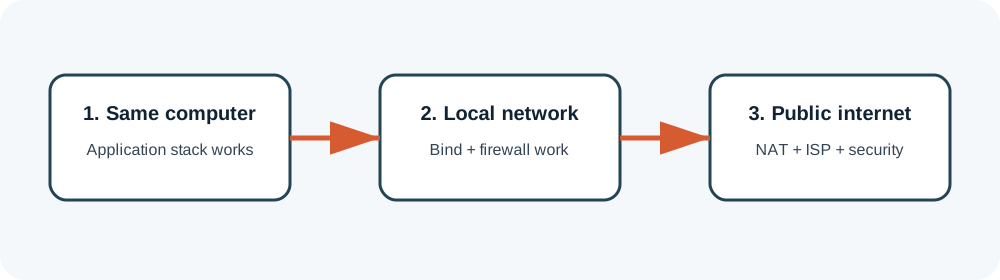
- Same-machine test. Proves the database, services and client package can work together.
- LAN test. Proves bind addresses and Windows Firewall rules.
- Remote test. Adds router NAT, public address and ISP restrictions.
LAN checklist
- Give the server a stable private IP or DHCP reservation.
- Confirm the server process listens on the LAN interface, not only loopback.
- Create narrow inbound firewall rules for required application ports.
- Point the second client to the server’s private IP.
- Test one service at a time and inspect server logs.
Before any public exposure
Use only a supported host OS, strong unique credentials, current firewalling and a network separated from personal devices. Never forward the SQL database port publicly. Forward only the minimum game-facing ports documented by your authorized package, and understand that operating a public private server may raise legal, security and terms-of-service issues.
Why port forwarding may not work
If the router’s WAN address differs from the public address shown by an external check, your ISP may use carrier-grade NAT. Traditional inbound forwarding will not work without an ISP-provided public address or an appropriate secure hosting design. Do not compensate by exposing remote desktop or database services.
Network diagnosis without opening everything
Prove the listener exists
On the server, confirm the expected process is listening on the expected private interface and port. If nothing is listening, router changes cannot help. Return to startup logs and configuration.
Test Windows Firewall narrowly
Create rules for the specific executable or required TCP/UDP ports on the private network profile. Temporarily disabling the entire firewall can be a diagnostic comparison, but it should not become the configuration.
Hairpin NAT can mislead local tests
Some routers do not allow a device inside the network to reach the server through the router’s public address. A remote tester may connect while a local client using the public address fails. Use the private address for LAN clients or configure local DNS appropriately.
Log remote attempts
Watch whether the connection reaches the server process. No log entry suggests the traffic is blocked earlier. A log entry followed by rejection points back to application configuration, version mismatch or authentication.
Package-specific values vary. Verify names, ports, database schemas and permissions against the files you are legally authorized to use. ZHowTo does not provide proprietary server files, anti-cheat bypasses or instructions for unauthorized access. Corrections: bugridez@gmail.com.