Direct answer: The exact executable names vary, but the dependency logic is stable: database first, then database-facing services, then authentication, then world/game services.
Use dependency logic, not filename guessing
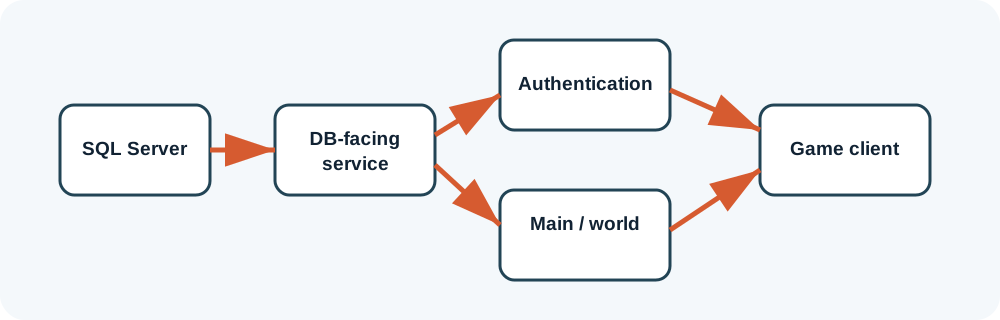
Community packages commonly include processes with names resembling authentication, DB and main/world services, but names differ. Read package notes and configuration references to identify each role.
A disciplined startup test
- Start SQL Server. Verify the application login and databases.
- Start the database-facing process. Wait and read its log.
- Start authentication. Confirm it connects to the database process or SQL.
- Start the main/world process. Confirm it registers with the earlier services.
- Launch the client last. Use a test account only after all server logs are stable.
Capture the first failure
The first error after a clean restart is usually more valuable than the twentieth. Later errors can be consequences. Save logs with timestamps, change one variable, restart the smallest affected set of services and compare.
Automate only after manual success
Server controllers and batch files are convenient, but they hide timing and log details during setup. Once the manual sequence works repeatedly, create a script with pauses and health checks. Keep a separate stop sequence that closes game services before SQL Server.
Reading startup behavior like a dependency graph
How long should you wait between processes?
Wait until the current process produces a stable “ready,” “listening” or equivalent state in its log, not an arbitrary number of seconds. On a slow VM, database initialization may take longer after a restore or reboot.
What if every process stays open?
Open windows are not enough. Check for repeating connection errors, failed registrations and retry loops. A healthy startup should settle rather than print the same failure continuously.
What if a controller starts everything successfully?
Keep it for daily use only after you can reproduce the sequence manually. Document the controller’s order and delays. If an update breaks the server, manual startup gives you visibility the controller may hide.
Use a clean stop sequence too
Stop client-facing and world services before database-facing services, then stop SQL last. Abruptly terminating SQL or the VM during writes increases the chance of recovery work and lost changes.
Package-specific values vary. Verify names, ports, database schemas and permissions against the files you are legally authorized to use. ZHowTo does not provide proprietary server files, anti-cheat bypasses or instructions for unauthorized access. Corrections: bugridez@gmail.com.