Direct answer: Build a local test environment first. Do not expose ports or edit game data until the database, DSNs and server processes work on one machine.
Decide what you are actually building
Before installing anything, write down the package name, approximate release era, included executables, database backup filenames and any readme notes. A 2006-era clean package, a custom 2012 repack and a modern source release may use different schemas, runtimes and start sequences.
Prepare an isolated machine
- Create a VM or spare test PC. Keep it separate from personal files and saved passwords.
- Take a clean snapshot. This is your return point before SQL, drivers and old runtimes are added.
- Record the machine name and IP. Use a stable private address for LAN testing.
- Create a project folder. Keep original archives read-only and work from copies.
- Scan all archives. Use more than one scanner when possible; old unsigned tools deserve caution.
Inventory the package before installation
Look for database backups such as .bak files, SQL scripts, server executables, client configuration, ODBC notes and required runtime installers. Do not assume every executable must run. A package may include optional launchers, editors or abandoned test utilities.
| Item | What to record | Why it matters |
|---|---|---|
| Database backups | Names, sizes, backup date, logical file names | Helps detect mismatched or incomplete backups. |
| Executables | Filename, folder, error log location | Reveals likely service roles and startup order. |
| Config files | Database, DSN, IP and port references | Creates a single checklist of values that must agree. |
| Tools | Purpose, input files, output files | Prevents a tool from silently overwriting the wrong package. |
Use this dependency sequence
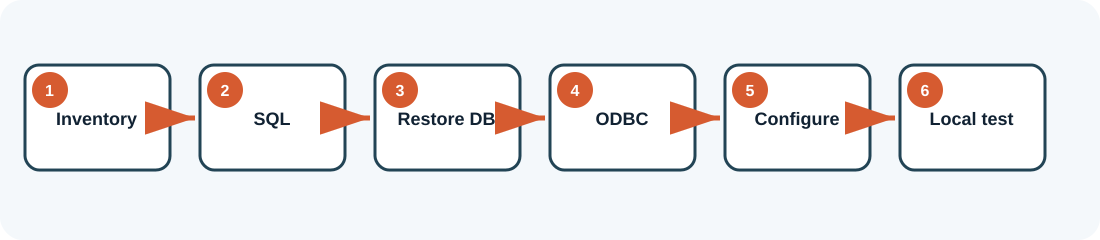
- Install SQL Server and management tools. Confirm the service starts after reboot.
- Restore the supplied databases. Verify they are online and readable.
- Create a least-privilege SQL login. Test it in SQL Server Management Studio.
- Create required DSNs. Use the architecture expected by the legacy executable.
- Align configuration values. Database names, DSNs, credentials, IPs and ports must match.
- Start one process at a time. Save each log before moving to the next.
- Test locally. Only after local success should you try another LAN computer.
Definition of done
Your first setup is complete when the SQL service survives a reboot, both core databases are online, the application login succeeds, each required DSN passes its test, the server processes remain open without repeating fatal errors, and a local client can log in using a disposable test account.
Do not call it complete merely because the executables are visible in Task Manager. A process can remain open while failing every database request.
Common first-build questions
Should the server and client be on the same computer?
For the first proof, yes. It removes router and LAN variables. Once login and world loading work locally, move only the client to a second computer. That second stage confirms the service is listening on the private network and that Windows Firewall permits the required traffic.
Can I combine files from several repacks?
Not during the baseline build. Executables, database schemas and configuration formats evolve together. Mixing an appealing client from one package with databases from another can produce subtle failures: authentication may work while character loading fails, or an editor may write fields that the server never reads.
What should I save after the first successful login?
Create full backups of every database, copy the exact server and client folders, export a list of DSNs, and take a VM snapshot. Add a short text file describing the startup order and test account. That becomes the known-good baseline for every later change.
When should I install editors and launchers?
After the unmodified package works. Optional tools add new variables and sometimes overwrite configuration. Test each tool against a copy or snapshot, document what it changes and keep it only if it solves a real administrative need.
Package-specific values vary. Verify names, ports, database schemas and permissions against the files you are legally authorized to use. ZHowTo does not provide proprietary server files, anti-cheat bypasses or instructions for unauthorized access. Corrections: bugridez@gmail.com.